USB port data leakage prevention utility capture mass storage media devices unauthorized access on windows network

Recover Data .in
Instant Solution Provider

Home Contact us Downloads Support Products
Business utilities
  English English Spanish Spanish French French German German italian Italian portuguese Portuguese Japanese Japanese Korean Korean Chinese Chinese Russian Russian Dutch Dutch Greek Greek
Network Security Utilities
 
USB activity monitoring software USB activity monitoring software
 

PAD Software PAD url

Delivery
After placing Order, You’ll receive an e-mail (Generally, within 5 minutes), having FULL version software Downloading link and Activation Key. Please click Delivery of Product for details.

Products purchased that are downloadable are NOT refundable. Please read our Terms and Conditions before purchasing the software. You MUST agree our Terms and Conditions before placing the order.

We record all IP Addresses (even if you’re using IP mask) for all transactions, investigate and prosecute all credit card frauds to the fullest extent of the International law.


USB activity monitoring software

Have you gone through the phase of data theft or data stealing due to the excess usage of USB mass storage devices without your consent or have your confidential data has been used by unauthorized users over Windows network? Don’t worry and give a break to all these mischief by adopting Data Doctor’s USB Activity Monitoring Software.

USB monitoring tool easily and effectively monitor the insertion and removal activities of USB mass storage devices in real time and also when in offline status i.e. if network connection is broken. Using this unique anti-data theft utility, the administrator can easily assign the USB device’s access and permission settings to all the clients in a network.

LAN based activity monitoring software works invisibly on Client’s machine, the client even can’t detect that his USB activities are being monitored on the server even if the network cable is unplugged. USB tracking utility, useful for all industries i.e. from small scale to large scale organizations prepares the activity log report and monitoring log report along with exact date and time of the activities performed by USB devices on client’s system. The description of log reports is explained as follows:

Activity Log

Activity Log consists of detailed information of all the changes performed by the Server in access and permission settings. It includes following information along with Computer Name, date and time details:

  • Access Settings: Makes the USB drive accessible or inaccessible on the client’s machine.
  • Permission Settings: Set the USB drive status to Read only or Readable/Writable both on the client’s machine.

Monitoring Log

Monitoring Log includes the detailed information of insertion and removal activities of USB mass storage devices fetched in real time monitoring and offline monitoring (i.e. when the network cable is unplugged or when the network connection is broken) of the client system.

The detailed information of USB device includes:

  • USB drive Status i.e. Detected or Removed or both.
  • Client PC’s Name and IP Address along with Date and Time.
  • USB Drive Name, hardware ID and device capacity.
  • Date and Time when information is received to the server.
  • Supplementary Information: Provide detailed information of Multiple Logical Drives.

Features:

  • Provides real time monitoring of the USB mass storage device activities on client’s systems over Windows network.
  • Monitor detection and removal of USB device even when the network cable is unplugged or network connection is broken.
  • Prepares real time log and offline log containing the detailed information of USB device activities on client’s systems.
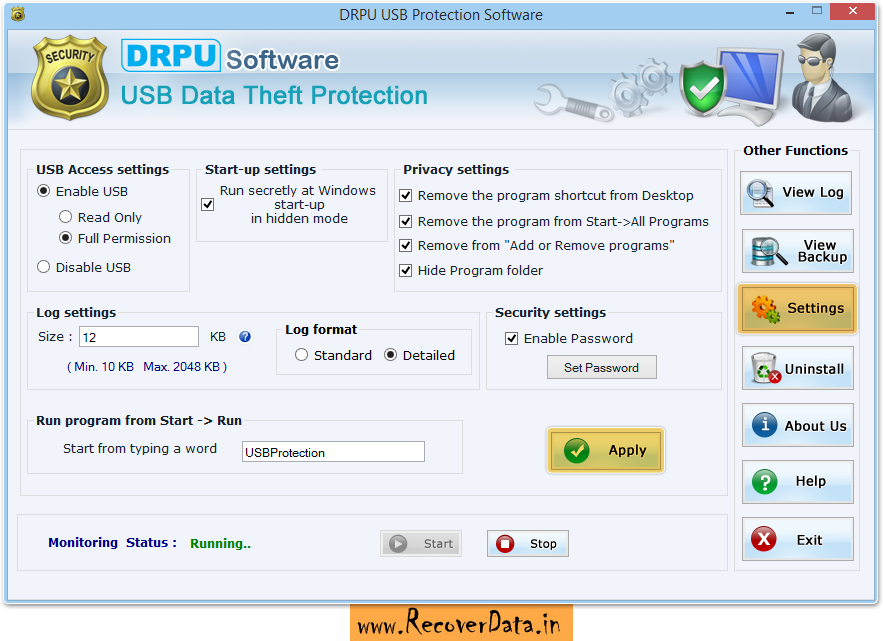
  • The administrator can easily enable or disable the USB mass storage device accessing on client’s terminal.
  • The administrator can make the USB device readable or both readable and writable for Client.
  • The access and permission settings are recorded in Activity log with date and time.
  • The Server can assign permissions for all the client’s machine in just a single click.
  • Provision of sound alert that notifies the administrator through a beep if any USB device activity happens on client’s computer system.
  • Activity log size can be increased or decreased as per requirement.

System Requirement:

  • Processor
    Pentium class or equivalent processor
  • Memory Space
    For Server: 512 MB RAM, 10 MB free hard disk space
    For Client: 256 MB RAM, 10 MB free hard disk space
  • Windows Operating Systems
    For Server: Windows Server OS
    For Client: Windows Client OS

Pro Data Doctor offers various software licensing options as per requirement. User can buy the USB data theft protection tool for windows network with different licensing options as mentioned below:


Download Demo


Licensing Options
Server having number of clients in network Order Now
Up To 10 Clients Order using Avangate Order using iPortis
Up To 25 Clients Order using Avangate Order using iPortis
Up To 50 Clients Order using Avangate Order using iPortis
Up To 100 Clients Order using Avangate Order using iPortis
Up To More Than 100 Clients Order using Avangate Order using iPortis


USB activity monitoring software Screenshot

Products
 
Data Recovery Utilities Password Recovery Utilities Business Utilities Network Security Utilities Software Setup Utilities
Forensics Utilities Database Conversion Utilities Bulk SMS Utilities PC Care Utilities Web Utilities
 

Payment options

Online Support

 
Home | Contact us | Support | Downloads | Products | Sitemap 1 | 2 | 3 | 4 | 5 | Terms and conditions

USB activity monitoring software